This is the second article in the How It Works series. The first covered how store priority controls stock allocation when a DC cannot cover the entire network.
LEAFIO AI, a retail inventory optimization platform serving 250+ retailers across 40+ countries, developed the Similar Families feature to address substitutable SKU management at the category level rather than the individual product level.
There is a category management problem that does not show up cleanly in any single KPI but costs retailers real money every season.
You have two similar products in the same category. They serve the same customer need. They sit on adjacent shelves. When one is out of stock, shoppers buy the other. When both are available, demand splits between them in a roughly predictable way.
Now imagine the central warehouse runs low on both. The replenishment system, treating each SKU independently, sends a full order for Product A and a full order for Product B. Both arrive. Suddenly you have combined overstock that neither product alone would have triggered.
Or the reverse: Product A gets ordered heavily because its individual target stock level looks critical, Product B gets nothing, and the store ends up with one SKU in excess and the other genuinely empty. From the customer's perspective, either would do.
According to IHL Group, out-of-stock situations cost retailers an estimated $1.77 trillion annually in lost sales globally. A meaningful share of that loss happens not because inventory does not exist but because it exists in the wrong SKU. Substitutable products managed independently create this gap systematically.
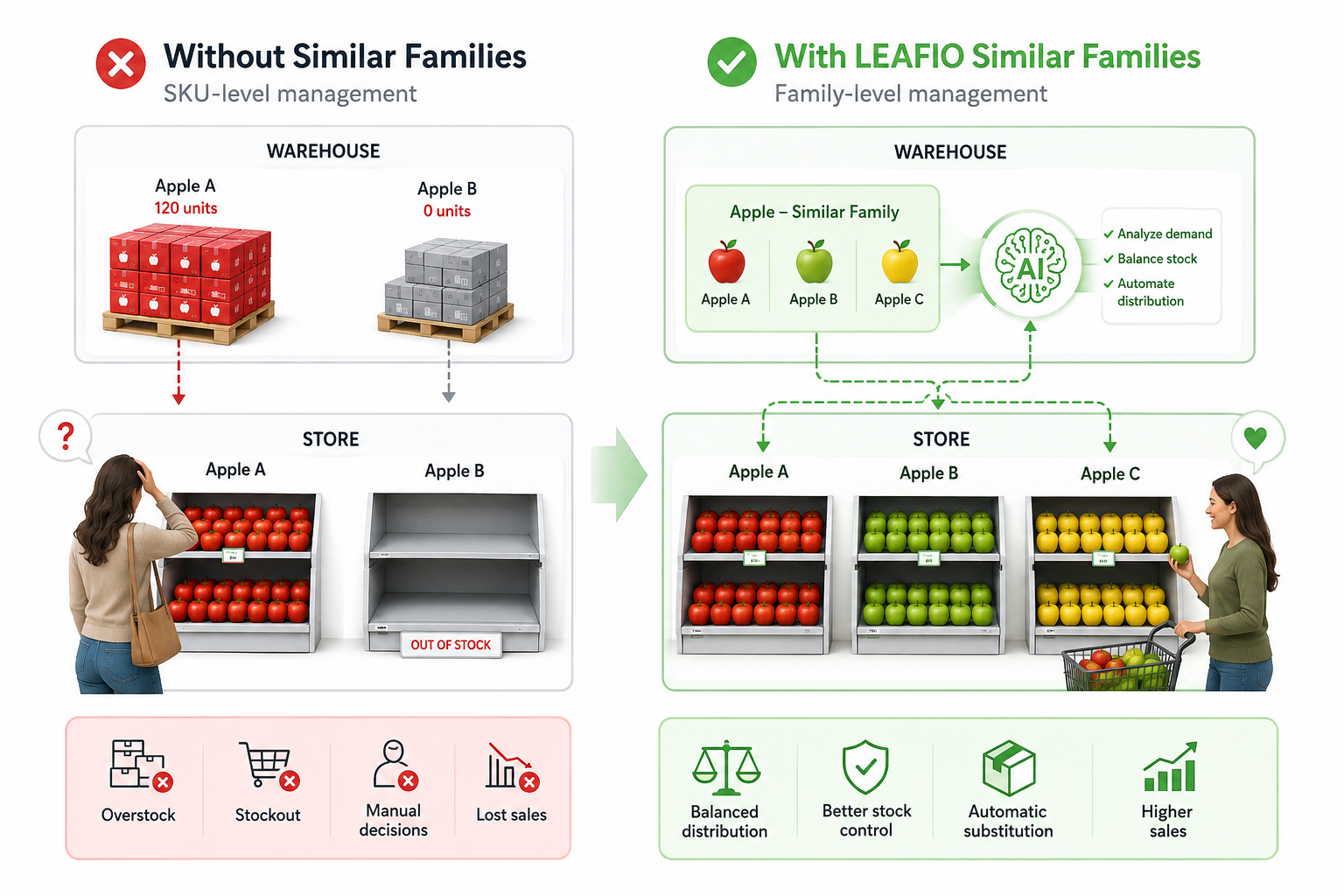
The LEAFIO Similar Families feature helps identify substitute products, automatically replacing the main product with another one available at the DC if it is out of stock.
What Is a Similar Family?
A similar family in LEAFIO Inventory Optimization is a defined group of substitutable or closely related SKUs: products that serve the same customer need and can replace each other when one is unavailable.
The grouping is set manually by the category manager, who understands the assortment logic better than any algorithm.
A similar family label is visible directly in the product tables across the Buffers, CDA, Fresh, DFO, and Stock pages, making it easy to see which products belong to a family and navigate to that family's settings without leaving the page.
Who Actually Uses This and Why
The range of use cases is wider than it might first appear. Here are the verticals where Similar Families delivers the most impact.
Grocery
Two types of red apples from different suppliers or cucumbers sourced from different vendors depending on the week. From the customer's perspective, it is the same green cucumber. From the system's perspective, without family logic, they are independent SKUs with independent replenishment. A category manager would otherwise need to manually update the assortment matrix every time one supplier's product is unavailable: checking whether the substitute is in stock, whether it needs to be added, or whether the other one should be paused. Similar Families automates that decision entirely.
Electronics
A lineup of televisions from Samsung, LG, and a third brand sitting in the same price tier and serving the same customer segment can be grouped as a family. When one model is out of stock at the DC or regional warehouse, the system automatically replenishes the shelf position with an available substitute, maintaining sales continuity until the original SKU is back. The slot does not go empty; the category does not lose the sale.
Auto Parts Distributors
A specific part may be temporarily unavailable, but an equivalent from a different manufacturer exists. Without family logic, the manager has to identify the substitute manually, propose it to the system, update the assortment matrix, and track whether the order was placed correctly. With Similar Families, the system handles all of it.
Pharmacy Chains
Ibuprofen under one brand name and the same active compound under another, or a generic alongside a branded equivalent. They are not identical products, but for most customers they are functional substitutes. Grouping them lets the system maintain category coverage even when one specific SKU is constrained.
Import-Heavy Retailers
Retailers with a large share of imported goods face this challenge structurally. Import cycles, customs delays, and supplier variability mean substitute SKUs are frequently needed, not as exceptions but as standard operating procedure.
The Three Mechanisms That Govern Family Behavior
LEAFIO AI manages similar families through three interconnected controls. Each addresses a different dimension of the same core problem.
Mechanism 1: Balance Distribution (Use Balance CW)
Balance Distribution is a setting that allocates central warehouse stock across substitutable SKUs in proportion to each store's actual need, rather than filling each SKU's buffer independently.
This controls how central warehouse stock is distributed among stores when multiple SKUs from the same family need replenishment at the same time.
Without family logic, each SKU is allocated independently based on its own buffer and demand. The result can be uneven: one store gets plenty of Product A, while Product B, which serves the same customer, goes short.
With Balance Distribution enabled, LEAFIO distributes available DC stock across the family's SKUs proportionally to each store's actual need. No single SKU takes more than its share of the available supply at the expense of its substitutes.
There are two levels:
- Balance: accounts for current DC stock when calculating distribution.
- Balance + In Transit: also factors in stock already on its way to the DC, giving a more complete picture of near-future availability. This is particularly useful for categories with frequent deliveries or tight replenishment cycles.
Mechanism 2: Stock Control (Surplus Prevention)
Stock Control is a family-level check that suppresses replenishment orders when combined inventory across a product family already exceeds near-term demand, even if individual SKU buffers appear healthy.
Stock Control answers a different question: what happens when several products from the same family are simultaneously sitting at a high stock level?
Each product individually might look fine. Its own buffer is comfortably covered; no overstock flag is triggered. But when you look at the family as a whole, combined inventory is significantly higher than what demand across both SKUs can absorb in the near term.
Stock Control adds a family-level check: even if an individual SKU's replenishment logic says 'order,' the system suppresses or reduces that order if the combined stock of the family already represents a surplus. The category as a whole drives the decision, not each SKU in isolation.
This matters most in:
- Fashion: multiple colorways of the same item can pile up simultaneously.
- Electronics accessories: near-identical variants competing for the same shelf.
- Fresh categories: where overstock carries direct expiry risk.
Mechanism 3: Count Control (Assortment Width Management)
Count Control is a rule that limits the number of distinct SKUs from a similar family that can hold active inventory simultaneously, preventing tail SKUs from accumulating stock at the expense of core sellers.
Count Control limits how many distinct SKUs from the same family can be on stock at the same time.
The rule: after replenishment, the number of family members with active inventory should not exceed the number of Make-to-Stock active products in the family. This prevents slow-moving tail SKUs from accumulating stock while core family members are the ones driving actual sales.
Going back to the apple example: the family has five apple varieties, but the category manager has defined that only two should be on the shelf at any given time. Count Control ensures the system focuses replenishment on whichever two are currently most viable, rather than spreading thin stock across all five.
Count Control is primarily focused on preserving assortment width. When the system understands that the matrix should contain two types of red apples and one of them is missing, it cannot cover the demand using stock from just one variety. It must identify another substitute and place an order to ensure the matrix width is maintained.
How the Three Controls Work Together
The power of similar families is not in any single mechanism. It is in how the three function as a system.
On every replenishment cycle, the system runs through this sequence:
- Stock Control fires first. Is the combined inventory of the family already at a surplus level? If yes, no order is placed regardless of what individual SKU buffers say. If not, an order is needed.
- Balance Distribution calculates the split. How should the available DC stock be distributed across stores so no single variety over-receives at the expense of the others?
- Count Control runs the final check. After this replenishment, will more than the defined number of varieties have active stock? If a third variety ends up with inventory in a two-variety family, the system adjusts the order to stay within the defined limit.
The result is a category that stays manageable: no combined overstock, no fragmentation across too many simultaneously active substitutes, and replenishment focused where it actually drives sales.
Who This Feature Is For
Similar Families is most useful for three roles:
- Category managers in any segment with substitutable products: grocery, pharmacy, electronics, fashion, auto parts, household goods. If you have ever seen two similar products simultaneously overstocked, or one running out while its substitute sat full, this is the fix.
- Supply chain analysts in multi-store networks where DC allocation creates inconsistency across locations for related SKUs. The problem compounds across a large network; family logic scales with it.
- Assortment planners managing product transitions, private label alongside national brands, or import-heavy categories where substitute SKUs are a structural necessity rather than an edge case.
The feature is particularly valuable for distributors with a significant share of imported goods, where supply gaps are frequent enough that substitution needs to be systematic rather than handled manually case by case.
What You Need to Set It Up
Configuration is straightforward and happens entirely at the family level:
- Define which SKUs belong to the family.
- Set the Balance Distribution mode: off, balance, or balance + in transit.
- Enable Stock Control and Count Control as needed.
No SKU-level configuration is required beyond family membership assignment. Management overhead stays low even for large assortments with many families.
The Underlying Shift
Inventory systems traditionally treat every SKU as an island. Similar Families is the recognition that retail assortments do not work that way. Products exist in relation to each other, compete for the same customer, and should be managed as a group.
For categories with real substitutability, and most categories have more of it than replenishment systems account for, shifting from SKU-level to family-level inventory logic can meaningfully:
- Reduce combined overstock across substitutable products.
- Improve allocation consistency across stores.
- Keep replenishment focused on the SKUs actually driving category performance.
- Free category managers from manual substitute tracking on a daily basis.
- Reduce lost sales by replenishing substitute products when the primary SKU is unavailable.
Frequently Asked Questions
What is a similar family in inventory management?
A similar family is a defined group of substitutable or closely related SKUs that serve the same customer need and can replace each other when one is unavailable. In LEAFIO Inventory Optimization, similar families are configured manually by the category manager and then managed automatically by the system across replenishment cycles.
How does LEAFIO Similar Families prevent combined overstock?
The Stock Control mechanism adds a family-level check to every replenishment cycle. Even if an individual SKU's buffer suggests an order is needed, the system suppresses or reduces that order when combined inventory across the family already exceeds near-term demand. This prevents situations where each product in a group looks fine in isolation but the category as a whole is over-stocked.
What is the difference between Balance Distribution and Stock Control?
Balance Distribution governs how available DC stock is split across substitutable SKUs relative to each store's actual need, preventing any one SKU from over-receiving at the expense of its substitutes. Stock Control governs whether an order should be placed at all, based on the family's total combined inventory level. The two mechanisms operate at different decision points in the same replenishment cycle.
Which retail categories benefit most from substitutable SKU management?
Grocery, pharmacy, electronics, fashion, and auto parts benefit most, particularly where two or more SKUs compete for the same customer and one can realistically replace the other in case of stockout. Import-heavy retailers also benefit significantly, since supply gaps make substitution a routine operating need rather than an exception.
How does Count Control work in assortment planning?
Count Control limits the number of distinct SKUs from a similar family that can hold active inventory at the same time. The ceiling is set by the number of Make-to-Stock active products defined in the family. If a replenishment cycle would push active inventory into a third variety in a two-variety family, the system adjusts the order to stay within the defined limit. This keeps assortment width consistent and prevents slow-moving tail SKUs from absorbing stock that should go to core sellers.
Can Similar Families be used for imported or seasonally variable products?
Yes. Similar Families is well suited to import-heavy categories precisely because supply gaps are structurally frequent. When one imported SKU is delayed or out of stock at the DC, the system automatically redirects replenishment to an available substitute, maintaining shelf coverage without requiring manual intervention from the category manager each time.


Have a question?

Ben Starynskii
AI-driven retail transformation expert