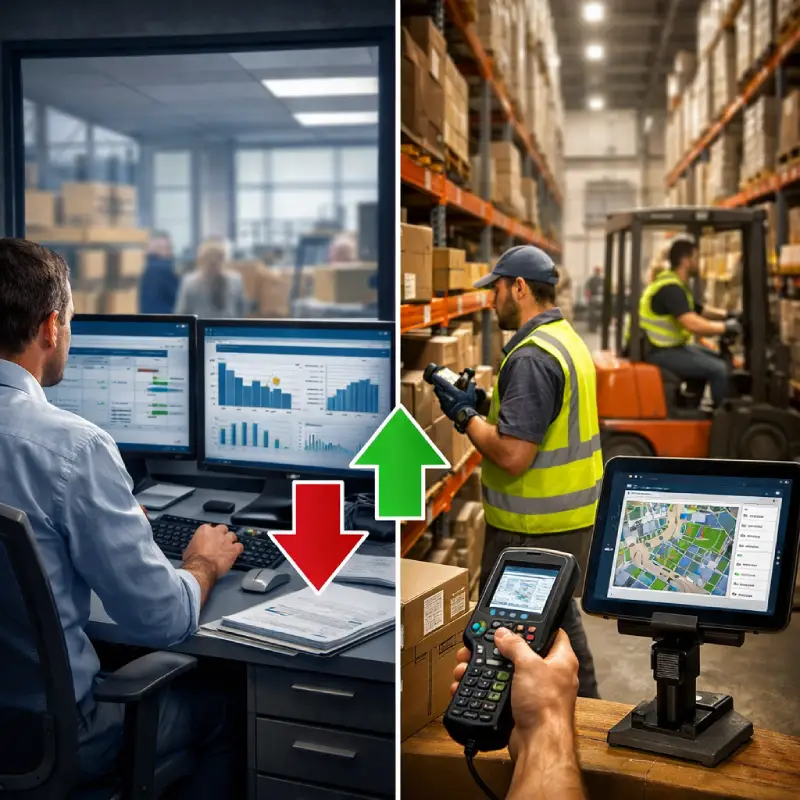


When people search for ERP vs. WMS, they are usually trying to answer one practical question: which system should actually manage our warehouse? An enterprise resource planning platform handles company-wide business functions: finance, procurement, HR, sales, and customer relationship management. A warehouse management system handles the physical operations inside the warehouse: receiving, putaway, picking, packing, and shipping. Both are part of the supply chain, but they operate at different levels: one runs the entire business, the other runs the warehouse.
The distinction matters more than it might seem. Most ERP platforms include basic warehouse modules, and for smaller operations, those modules are good enough. But once your distribution centre handles more than 5,000 SKUs or processes more than 200 orders per day, those modules tend to become the bottleneck. This article explains exactly where ERPs fall short in warehouse operations, what WMS solutions actually do differently, and when a dedicated solution is the right next step.
| Parameter | ERP (Enterprise Resource Planning) | WMS (Warehouse Management System) |
|---|---|---|
| Primary purpose | Business functions: finance, procurement, HR, sales | Warehouse operations: receiving, putaway, picking, packing, shipping |
| Inventory tracking | Batch updates, daily sync. Knows 'how many' | Real-time data, per-scan. Knows 'where exactly' and 'in what condition' |
| Picking management | Basic or absent | Wave, batch, zone, cluster picking |
| Labor management | Not included | Task interleaving, productivity per picker |
| FEFO/FIFO control | Manual or limited | Automatic, system-enforced |
| Multi-zone support | Limited | Full support of zones, aisles, and bins |
| Barcode/DCT scanning | Add-on or absent | Native |
| Audit trail | Limited | Full tracking of every movement |
| Best for | DC up to 3,000–5,000 SKUs / up to 100 orders/day | DC with 5,000+ SKUs / 200+ orders/day |
| Used together? | Yes, WMS integrates with ERP via API | |
What Your ERP Actually Does in the Warehouse
To be fair to ERP systems: they were not designed to run warehouses. Enterprise resource planning was built to unify various business functions and business processes across the company: finance, HR, procurement, sales, and customer relationship management. All of that lives inside an ERP and works reliably. It is the backbone of supply chain planning at the business level.
In retail distribution, the warehouse exists to serve stores. Every picking decision and replenishment cycle feeds directly into outbound distribution speed and accuracy. That context matters when evaluating what your warehouse system needs to do for inventory management.
Where ERP warehouse operations run into limits is at the physical level. A standard ERP can tell you how many units you have in stock. In most implementations, it cannot tell you where exactly those units are, what condition they are in, or who last handled them. Inventory tracking at the bin level, real time data on every movement: these are capabilities that standard ERP warehouse modules were not designed to provide.
Most major ERP platforms include warehouse management modules. In typical implementations, though, their warehouse management capabilities cover the basics: quantities, purchase orders, and broad inventory balances. The warehouse management features in a standard ERP module are generally not built for optimized picking, real-time bin-level inventory management, or automated FEFO enforcement at scale. Warehouse efficiency at that level requires a different kind of tool.
The 5 Signs Your ERP Can No Longer Handle Your Warehouse
These are not abstract warning signs. They are patterns that show up in real operations when ERP warehouse management starts to reach its limits.
Sign 1. Picking errors are increasing as your order volume grows
When volumes were lower, pickers managed by memory. As volumes climb, that stops working. Without optimized routing, pickers move inefficiently, and error rates rise. At 500 orders per day it becomes a serious supply chain problem. Most ERP systems were not designed with the task routing logic needed to assign and optimize picking jobs at high volumes.
Sign 2. You have no real-time visibility into what is in stock
Your ERP says there are 200 units of product X. But where exactly? On the receiving dock? In quarantine? On shelf A3-15? Granular inventory visibility at the bin level is not what standard ERP inventory tracking was designed for. Without real-time data on every item's position, every discrepancy becomes a manual investigation.
Sign 3. Warehouse staff work from memory, not from the system
When a senior employee calls in sick, the team struggles to find products or manage the flow. The knowledge of how business functions inside the warehouse lives in people, not in the system. A WMS stores all of that operational logic in the database, not in someone's head.
Sign 4. Inventory counts take days, not hours
A full inventory count in an ERP-managed distribution centre typically requires stopping operations for two or three days. That is lost throughput, frustrated staff, and delayed orders. Disrupting warehouse processes this way is a direct drag on operational efficiency. WMS platforms enable cycle counting, meaning partial counts can run continuously without halting normal activity. The warehouse keeps moving while the count happens around it.
Sign 5. You cannot trace where an order went wrong
A customer reports the wrong item. You have no way to trace who picked it, from which bin, at what time. Most standard ERP modules do not maintain a granular audit trail at the level of individual warehouse movements. Without traceability, errors repeat, and customer satisfaction suffers. A WMS records every movement with a timestamp and user.
What a WMS Does That Your ERP Cannot
A warehouse management system is built for a different job than an ERP. Where an ERP runs company-wide operations, WMS focuses exclusively on optimizing warehouse operations. Understanding ERP vs WMS at this level helps operations directors make the right call. The best dedicated WMS solutions cover five areas where standard ERP warehouse modules typically fall short.
For a full overview, see the LEAFIO Warehouse Management System product page. For a detailed breakdown of individual capabilities, the key features of a WMS guide cover each one in depth.
Real-time bin-level tracking
A WMS tracks every unit at the bin or slot level in real time, updating records per-scan rather than per-batch. Every inventory movement is captured instantly, giving managers full inventory accuracy: a precise location and condition for every item, not just a quantity. That level of detail makes counting faster and the entire operation more predictable.
Optimized picking workflows
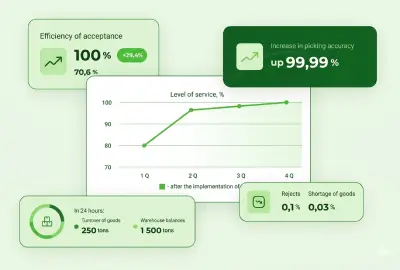
Rather than leaving pickers to navigate by experience, WMS software assigns tasks intelligently and builds routes that minimize travel distance. Warehouse layout optimization, which means structuring zones and slot assignments to reduce picker movement, works hand in hand with WMS-driven routing. Wave, batch, zone, and cluster picking are all supported. Barcode scanning at every step reduces reliance on manual data entry. The result speaks for itself: companies that add a WMS to their ERP report picking accuracy improvements from 85% to 99.95%.
For a detailed look at how each picking method works, the warehouse picking methods guide covers the trade-offs in detail.
Automatic FEFO and FIFO enforcement
In grocery, pharmaceutical, and health and beauty supply chain environments, getting stock rotation wrong creates compliance risk. Not just operational risk. Regulatory risk. A WMS enforces FEFO and FIFO rules automatically at every pick, without relying on staff to check manually. Warehouse zones with different temperature requirements are managed within a single system. LEAFIO WMS was built specifically for these environments, where inventory management of perishables and batch traceability directly affect warehouse efficiency and compliance.
Task interleaving
Without task interleaving, a picker completes one task and returns empty-handed before starting the next. Dead time, multiplied across every shift. A WMS eliminates that by assigning the next task along the return route. Across an entire shift, this adds up to a measurable improvement in operational efficiency, without adding headcount.
Labor productivity tracking
WMS systems track task completion at the individual level: who picked what, how long it took, and where the bottleneck occurred. Unlike ERP business processes, which report at the transaction level, WMS labor tracking goes deeper. That granular data makes staffing decisions more accurate and workforce planning more effective.
Do You Replace Your ERP or Add a WMS?
The answer is clear: you add a WMS. You do not replace your ERP. Enterprise resource planning and warehouse execution are complementary layers, not competing ones. The ERP remains the system of record for finance, procurement, and inventory quantities. The WMS focuses on warehouse operations: every inventory movement inside the DC is tracked in real time.
Dedicated WMS solutions receive orders from the ERP, execute them across every zone and bin, and return confirmations via API. Business functions and business processes like invoicing happen in the ERP once the WMS reports shipment. Adding a WMS fills the execution gap that most standard ERP warehouse modules leave open.
Here is how the flow typically works:
LEAFIO warehouse management system integrates with existing ERP systems via API, tracking every movement from receiving to dispatch. A standard full implementation, including configuration, integration, testing, and go-live, runs 8 to 12 weeks from contract signing.
Real Results: What Happens When You Add a WMS to Your ERP
The numbers below come from documented LEAFIO WMS implementations, not projections.
Auto parts distributor, Eastern Europe
An Eastern European auto parts distributor managed a warehouse with more than 3,000 active SKUs through staff expertise alone. With no defined warehouse layout logic, no systematic stock accuracy process, and no single management tool, the operation depended entirely on individual knowledge. After implementing LEAFIO WMS, customer complaints related to shipping errors dropped from 15% to 0.01%. Inventory counts can now be conducted at any time without interrupting normal activity.
Medical device distributor
A medical device distributor operating a 3,500 square meter facility with more than 1,000 active SKUs faced unprocessed defects and poor consolidation control. The DC lacked structured inventory management and inventory accuracy controls. Following implementation, picking accuracy reached 99.95% against the industry average of 96–98%. The error rate dropped to 0.01%, and order processing time was reduced by a factor of three.
Second auto parts distributor
A spare parts distributor, exclusive distributor of several international auto parts brands, faced the same pattern: manual replenishment that did not keep pace with supply chain demands, no consolidated warehouse management tool, and declining customer satisfaction. After full warehouse automation with LEAFIO WMS, labor productivity increased by 40%. Inventory tracking and cycle counts are now conducted without interrupting warehouse operations, and shortages are recorded automatically.
When Is Your ERP Warehouse Module Actually Enough?
Not every operation needs a dedicated WMS. The ERP vs WMS decision is simple for smaller setups: modern ERP systems and basic software solutions are a reasonable starting point. It becomes pressing only when complex operations outgrow those modules. WMS solutions make economic sense when the cost of errors and customer complaints exceeds the cost of implementation and for most growing DCs, that happens faster than expected.
If all of the following are true, ERP solutions with basic warehouse management features are likely sufficient for now:
- Fewer than 3,000 to 5,000 SKUs in the warehouse
- Fewer than 50 to 100 orders per day
- A single warehouse location with a simple warehouse layout, one product type
- No requirements for FEFO, serial number tracking, or batch traceability
- A warehouse team of three to five people
If at least two of those conditions do not apply today, you are likely past the point where basic ERP warehouse management is the right tool. A dedicated warehouse management system focused on optimizing warehouse operations is the logical next step. Most retail DCs achieve full ROI within 12 to 18 months. While the ERP keeps running the entire business, the WMS compounds its value with every order processed.
For a breakdown of implementation costs and expected ROI, the warehouse management system cost guide covers the numbers in detail.
Frequently Asked Questions
What is the main difference between ERP and WMS?
The ERP vs WMS distinction comes down to scope. Enterprise resource planning manages company-wide business functions: finance, procurement, HR, customer relationship management, and master data. A warehouse management system manages physical warehouse operations (receiving, putaway, picking, packing, and shipping) with real-time bin-level accuracy that most standard ERP modules are not designed to provide.
Can a WMS replace an ERP?
No. WMS systems and ERPs work together as complementary layers. The ERP manages business transactions, business processes, and master data. The WMS handles warehouse operations on the floor: warehouse layout, task routing, and bin-level accuracy in real time. They connect via API so data flows automatically.
Do I need a WMS if I have an ERP?
It depends on your scale. If your DC manages more than 5,000 SKUs or processes more than 200 orders per day, your ERP module is unlikely to be enough. The right dedicated software solutions are built for high-volume warehouse operations where ERP inventory management and stock tracking lose accuracy at scale.
When should I add a WMS to my ERP?
When your DC handles more than 5,000 SKUs or 200+ orders per day, or when picking errors and stock discrepancies are growing faster than your order volume. Any of the five signs described above is a practical indicator that the time has come.
How long does WMS and ERP integration take?
A full LEAFIO WMS implementation runs 8 to 12 weeks from contract signing, including configuration, integration, testing, and go-live. The integration component itself typically takes 4 to 8 weeks, depending on the complexity of your warehouse and ERP system.


Have a question?

Andrew Ivarsen
Logistics Optimization Expert